
Your IDE in 2026 ships with AI by default. The question is no longer whether to use intelligent autocomplete, but which one. GitHub Copilot, Cursor AI and Claude Code are fighting for developers’ wallets and each has a distinct profile. Here’s the honest comparison so you pick the one that really fits your way of working.
We’ve used all three for months on real projects — Node and Python backends, React and Next frontends, Terraform infra. Here’s what matters.
What each one is (no marketing)
GitHub Copilot
The original assistant. Extension that lives inside your IDE (VS Code, JetBrains, Vim). Its strength: natural autocomplete while you type. In 2026 it has added a decent chat panel and Agent mode for multi-file tasks, but its DNA remains inline.
Cursor AI
Full editor based on VS Code. Not an extension, a whole IDE. Its key difference: it indexes your entire repository for true contextual suggestions. Lets you chat with your code and run agents that touch several files at once with versioned control.
Claude Code
Newest of the three. Works as a CLI or integrated with your IDE. Bets on agents with access to your file system and a model (Claude Sonnet 4) that excels at complex refactor. More “do this for me” than “help me as I type”.
Practical comparison · 2026
Inline autocomplete
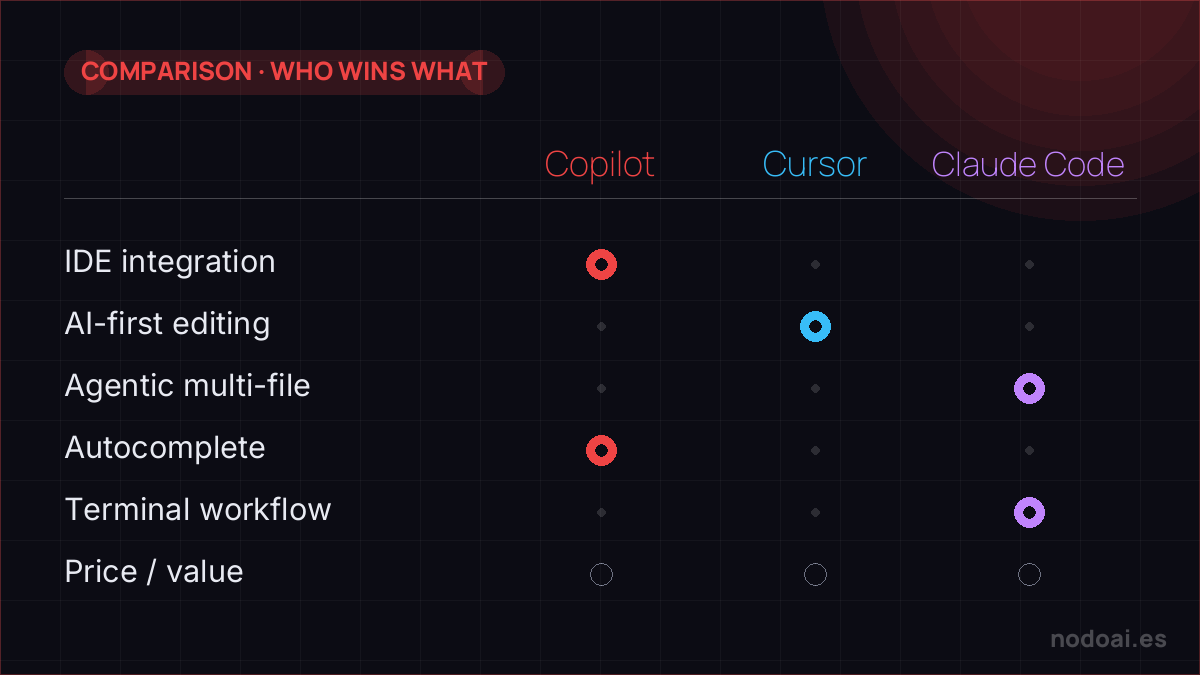
Winner: Copilot. Polished for years. Suggestions while you type are the least intrusive and most natural. Cursor does it well but is a bit slower in some contexts. Claude Code doesn’t compete in this category.
Multi-file refactor
Winner: Cursor in a technical tie with Claude Code. Cursor shines because it knows your whole repo at once. Ask “rename this function everywhere it’s used, adjust tests, update docs” and it delivers a reviewable diff. Claude Code does the same from the terminal with finer-grained control.
Complex refactor and subtle bugs
Winner: Claude Code. When you’ve spent two hours on a bug that only reproduces in one specific case, Claude Sonnet 4 reasons better about the full code flow. For logic-type errors, deadlocks or race conditions, it wins.
Speed and daily ergonomics
Winner: Copilot. It’s invisible when it works well. Cursor forces you to switch IDEs — not a technical barrier but an ergonomic one if your team uses something else.
Team work
Winner: Copilot for native GitHub integration: PR reviews, security suggestions, code search. Cursor is improving on this front but is still individual-first.
Price
- Copilot: $10/mo individual, $19/mo business, $39/mo enterprise.
- Cursor: free with limits, $20/mo Pro, $40/mo Business.
- Claude Code: included in Claude Pro ($20/mo) and higher plans.
If you already pay for Claude Pro, Claude Code is “free” as a bonus. That detail is driving many developers who already had a subscription.
Who each one is for
- Copilot: devs at large companies with GitHub corporate, teams that value integration and staying in their usual IDE. Ideal if 70% of your work is “writing code while you think”.
- Cursor: solo developers or small teams that write lots of new code, refactor frequently and accept changing editors. Great for indie hackers and technical startups.
- Claude Code: developers already living with Claude for other tasks, those who prefer CLI and “do this for me” agents over passive autocomplete. Best for long refactor and complex debugging.
Can they be combined?
Yes, and many professionals do. Common combinations:
- Copilot + Claude Code: Copilot for day-to-day writing, Claude for big “stuck” moments. Works because each covers a different axis without overlap.
- Cursor + Claude Code: Cursor as main IDE, Claude Code in the terminal for batch tasks (migrations, mass generation).
What we don’t recommend: having Cursor and Copilot at the same time. Inline suggestions clash, slow you down and create confusion.
Common mistakes when starting with AI in the IDE
- Accepting without reading. Fast autocomplete is deceptive: it looks faster but you create bugs that take 3x longer to debug.
- Requesting refactor without tests. Before a big refactor, make sure you have tests covering the behavior. Otherwise the refactor can run over you and you won’t notice until production.
- Pasting secrets in chat. Keys, tokens and client data do NOT go in AI chat. Configure .gitignore and explicit exclusion in your client.
- Not reviewing the diff. Any agent touching more than one file should deliver a reviewable diff before applying. If your tool doesn’t, change tools.
Our recommendation: which we choose for coding
We code with all three. No brochure, just what we really think:
- GitHub Copilot: the most convenient if you live in VS Code/GitHub; autocomplete and chat with no friction.
- Cursor: our favourite for serious projects; it understands the whole repo and makes changes across many files with agents.
- Claude Code: brilliant in the terminal for agentic tasks and reasoning over large codebases.
Our advice: start with Copilot if you want the simple option; move to Cursor or Claude Code as the project grows. And always review what they generate: they speed you up, but don’t excuse you from understanding the code.
Frequently asked questions
Is Cursor AI better than GitHub Copilot in 2026?
For complex refactor and multi-file context, yes. For fluid daily autocomplete and GitHub integration, Copilot is still better. The choice depends on the weight of each in your work.
Which is cheaper, Copilot or Cursor?
Copilot individual costs $10/mo, Cursor Pro costs $20/mo. However, Cursor has a limited free plan and many bootstrapped users prefer it for that.
Do I need to know how to code to use Cursor or Copilot?
Yes. Both are assistants, not replacements. They accelerate a developer with judgment, but without coding skills they produce code you won’t know how to debug when it fails.
Does Claude Code work on Windows and Linux?
Yes. Claude Code works on macOS, Windows and Linux via CLI and IDE extensions like VS Code and JetBrains.
Are these assistants safe for proprietary code?
Business and Enterprise plans guarantee your code is not used to train models. For individuals, always review privacy settings: every provider lets you disable telemetry.
Related reads on NodoAI
- Cursor AI review · full tool deep-dive.
- GitHub Copilot review · full tool deep-dive.
- Claude review · the model behind Claude Code.
- State of LLMs 2026 · how all major models compare.
Related: Claude Code vs Codex CLI vs Gemini CLI: terminal agents in 2026.
Leaning toward Cursor? Do not miss its standout feature, explained step by step: Cursor Background Agents.