An AI agent is a system that doesn’t just answer, but carries out a task end to end: it reads something, decides what to do and acts. n8n is one of the best ways to build your first agent without big complications. This guide takes you, in about 30 minutes, from zero to a working agent, explaining each piece without assuming anything.
What an agent is (and how it differs from an automation)
A classic automation follows fixed rules: “if A happens, do B”. An agent adds a layer of AI decision-making: given an input, a model reasons about what to do and chooses the action. That’s why an agent suits tasks where not everything is predictable: classifying with judgment, writing an appropriate reply, or deciding who to notify.
What n8n is and why start there
n8n is a visual automation platform: you connect “nodes” (each one an action) without coding. Its advantages for starting: it’s powerful, can be self-hosted and connects to almost everything, including AI models. You build the flow by dragging, test it and activate it.
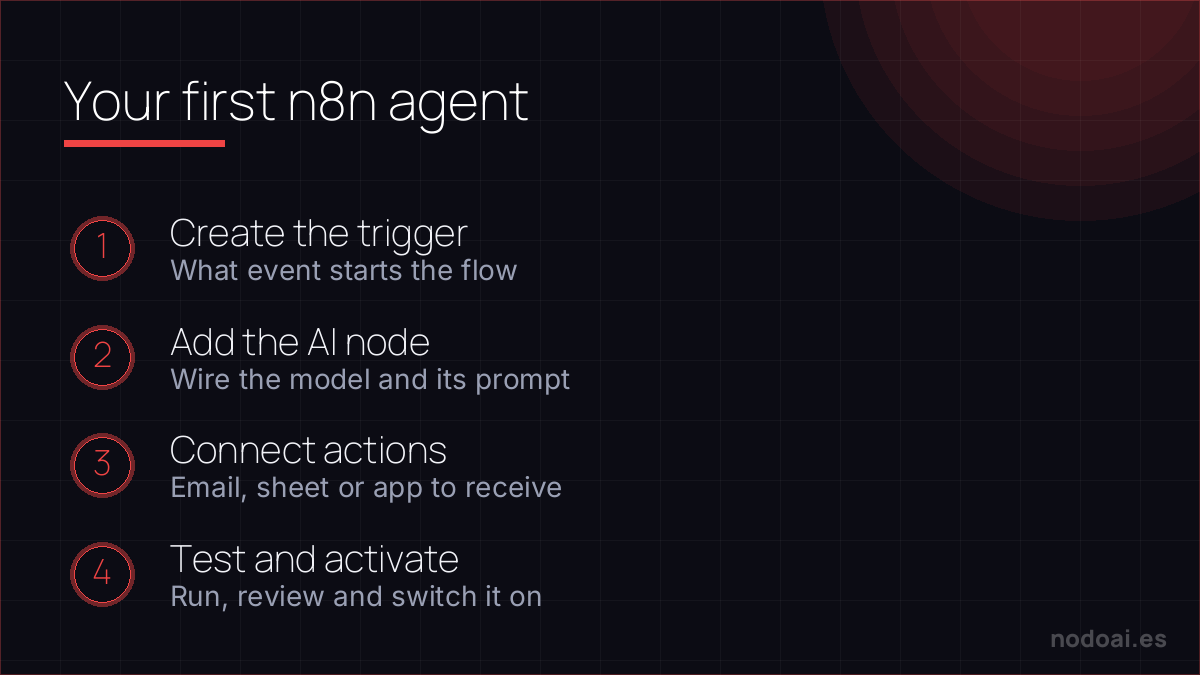
Your first agent, step by step
- Define the task: pick something concrete and useful, for example “classify incoming emails and draft a reply”.
- The trigger: a node that fires when what you want to process arrives (an email, a form, a message).
- The AI node: you connect the model (ChatGPT, Claude) and give it clear instructions on what to decide or generate.
- The action: based on what the AI decides, another node acts: tags the email, creates the draft, notifies the team.
- Test it: run real cases and check it decides and acts as you expect.
The key: clear instructions to the model
The agent is only as good as the instructions you give it. Tell it its role, what it must decide, by what criteria and what output format you want. The more precise the brief, the fewer surprises. Start with a narrow task before asking it anything complex.
Cautions before letting it loose
- Start with human approval: have the agent propose and you approve until you trust it.
- Limit permissions: give it access only to what it needs, not everything.
- Privacy: don’t process confidential data in services without guarantees.
- Supervise: review the first days; agents can make mistakes.
Our experience with your first agent in n8n
- Make the first one tiny. One trigger, one decision, one action. The temptation to build “the agent that does it all” is exactly what makes you give up.
- The “30 minutes” is the happy path: in practice, expect to debug credentials, formats and edge cases. That’s normal; it’s part of learning.
- What helped us most: testing each step separately before joining them, and adding an alert when something fails so you find out in time.
Our advice: celebrate that your first agent works even if it does little. You expand that base later; the hard part is understanding the flow, not adding steps.
Frequently asked questions
Do I need to know how to code?
Not to start. n8n is visual and you build the agent by connecting nodes. For very advanced flows some logic helps, but you build your first without code.
Is it free?
n8n has a self-hosted option and trial plans; AI APIs have a usage cost, usually low to start. You can validate your first agent cheaply.
What’s a first agent good for?
For repetitive tasks with some judgment: classifying, drafting replies, notifying. Ideal for offloading the mechanical-with-decision work.
Is it safe to give it autonomy?
Start with supervision and limited permissions. As it proves reliable, you grant more autonomy. Never fully release it on sensitive tasks.
Conclusion
- An agent decides and acts; a classic automation just follows fixed rules.
- n8n lets you build your first agent visually, without coding.
- The secret is clear instructions and a narrow task.
- Start with human approval, limited permissions and supervision.
More in how to automate with AI using Make and n8n and 10 AI automations that save hours.
Related: how to create your own Custom GPT.