The question is not “n8n Cloud or Self-Hosted?” in abstract. The real question is: what is more cost-effective for you, considering your time, number of executions, and maintenance tolerance? In 2026, both options have evolved significantly, and the answer depends on a few very specific variables that we will break down.
This is not a marketing review. It goes straight to the point with numbers, real cases, and what happens when the chosen plan falls short.
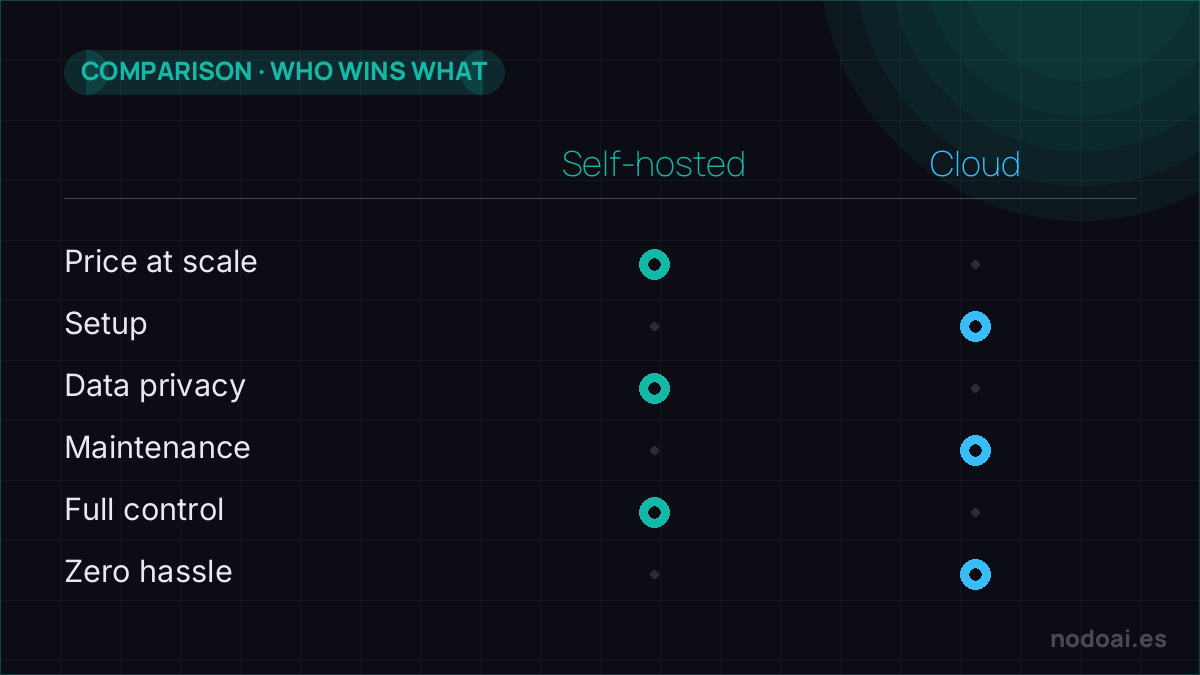
Summary Table · what to choose according to your case
| Your situation | Best option | Monthly cost |
|---|---|---|
| Prototypes and personal projects (< 100 executions/day) | Self-Hosted on a small VPS | 4-7 $ |
| Freelance with 3-5 light clients | n8n Cloud Starter | ~24 € |
| Agency with intensive AI workflows | Self-Hosted on a medium VPS | 20-40 $ |
| Company with SSO and compliance | n8n Cloud Pro/Enterprise | 60 € onwards |
| Workflows with sensitive data (legal, medical) | Self-Hosted mandatory | Variable |
Real figures in 2026
n8n Cloud starts at 24 €/month (Starter) or 60 €/month (Pro). The Community Edition (self-hosted) is free: you only pay for the server, which can range from 4 $ on a basic VPS to ~7 $ on managed platforms for n8n.
Here’s the sensitive point: the Cloud Starter plan limits you to 2,500 executions/month. It sounds like a lot until you have an AI workflow with a webhook that triggers 100 times/day — you’ll reach that limit in 25 days.
The factor people often forget: AI
In 2026, n8n has become a serious AI agent platform with over 70 native LangChain nodes. AI Agent node, Vector Stores (Pinecone, Qdrant, Supabase, Azure AI Search), conversation memory, response streaming — all within the visual workflow without writing code.
This changes the self-hosted vs Cloud balance for two reasons:
- Local AI. Self-hosted allows you to run Ollama+Llama-3 on the same server. Zero latency, zero data leaving your premises. For clients with strict compliance, it’s almost mandatory.
- Intensive executions. An AI agent can consume 5-10 executions per interaction. If you have a serious chatbot, Starter won’t be enough — you’ll need Pro or self-hosted.
Self-Hosted · real pros
- Free forever with Community Edition.
- Unlimited executions. No paywall on each workflow run.
- 500+ integrations identical to Cloud.
- Your data doesn’t leave. Critical for strict GDPR and regulated sectors.
- Local AI compatible (Ollama, llama.cpp, vLLM).
- Savings of 200-700 €/year on medium-intensive workflows.
Self-Hosted · real cons
- You’re the sysadmin. Updates, backups, SSL, uptime — your responsibility.
- No official support (Community Edition).
- SSO, advanced debugging, audit logs: reserved for Enterprise.
- The initial setup takes 2-3 hours if you’re new to Docker.
Cloud · real pros
- No infrastructure. You sign up and start in 5 minutes.
- Automatic updates. You don’t worry about the version.
- HTTPS, managed database, high availability included.
- Official support in Pro and higher plans.
- SSO, audit logs, debugging in high plans.
Cloud · real cons
- Execution limit per plan, especially painful for AI agents.
- Data passes through n8n servers. Not always acceptable.
- Cost scales quickly in intensive workflows: from Starter to Pro, there’s a significant jump.
- You can’t run Local AI on the same network.
When to switch from one to the other
The two typical routes I see in clients:
- Start with Cloud Starter while you validate your first 2-3 workflows with clients. When you exceed the 2,500 execution limit or need Local AI, switch to Self-Hosted.
- Start Self-Hosted if you come from the dev world and Docker doesn’t scare you. Only migrate to Cloud if an Enterprise client demands it for support reasons.
FAQ
Is Self-Hosted really free?
The license is (fair-code). But you pay for the VPS where it runs. Realistic minimum: 4-7 $/month.
Does n8n Cloud comply with GDPR?
It has EU servers, yes. But for extremely sensitive data (medical, strict legal), Self-Hosted provides more guarantees.
Can I migrate from Cloud to Self-Hosted?
Yes. n8n exports all workflows in JSON. Import them into self-hosted and you’re done.
What happens to credentials when migrating?
Credentials are instance-specific. You’ll need to re-enter them. They’re not exported for security reasons.
Is n8n worth it vs Make or Zapier?
It depends on the case. n8n wins in technical flexibility and AI. Make in visual simplicity. Zapier in the number of simple integrations. We cover all three in Make vs n8n comparison · 2026.
Next step
If you want to learn AI automation from scratch, the intermediate course dedicates an entire module to Make and n8n. If you already handle n8n and want to make a living from it, check out the guide Automation with AI · real jobs with rates and cases.
Sources: n8nlab · Northflank · Self-host n8n.
Our recommendation: self-hosted or cloud
- Cloud if: you want to start today without maintaining servers and the price fits your current volume.
- Self-hosted if: cost at scale, data privacy, or integrations and control the cloud limits matter to you.
- The catch: “free” in self-hosted isn’t free: you pay in maintenance time, updates and backups.
Our advice: start on the cloud to validate your idea; move to self-hosted when the savings or the privacy justify it and you have someone to maintain it.