“AI polaroids” have flooded social media: instant photos with their white frame, direct flash and eighties grain… of scenes that never happened. The trend exploded with Gemini’s image editor (Nano Banana) and it’s one of the easiest to replicate well. Here’s the prompt that works, the most popular variants and the line you shouldn’t cross with other people’s photos.
What the polaroid trend is (and why it hooks)
- The aesthetic: white instant-photo frame, hard flash, slightly washed-out colours and that nostalgic 80s-90s family-album air.
- The AI twist: you upload one or two photos and ask it to turn them into a polaroid: you as a youngster, you with your pet “in the 90s”, a recreated family scene…
- Why it works: nostalgia does 90% of the job; the frame and the flash also hide the AI’s small imperfections.
The method and the base prompt
- 1. A sharp source photo: frontal, face clearly visible; it can be current even if the scene you ask for is “vintage”.
- 2. Tool: Gemini’s image editor (Nano Banana) is the one that popularised the trend; ChatGPT’s generator does it well too.
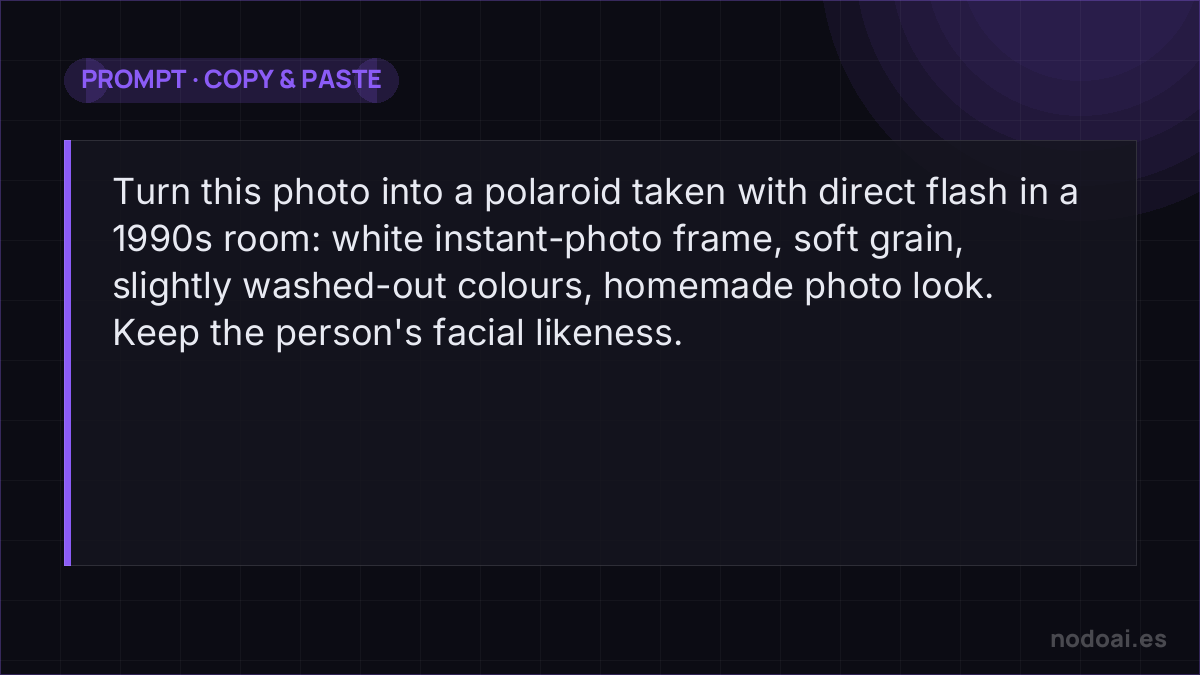
- 3. Base prompt: “Turn this photo into a polaroid taken with direct flash in a 1990s room: white instant-photo frame, soft grain, slightly washed-out colours, homemade photo look. Keep the person’s facial likeness”.
- 4. Popular variants: “with my younger self” (uploading a childhood photo and a current one), with your pet, a couple’s version, or the impossible scene with a relative from another era.
Tricks to make it look like a real album
- Ask for imperfection: “slightly out of focus”, “flash glare on the forehead”, “hard shadow on the wall”. Perfection gives the AI away; the flaw sells the vintage.
- Dress the scene: mention era-appropriate furniture, clothes or haircuts so everything matches.
- A handwritten caption (“summer of ’94”) on the white frame seals the effect.
Getting the authentic instant-photo look
The charm of the AI Polaroid trend is imperfection — and that's exactly what to ask for:
- Name the details: the white border, slightly washed colours, soft focus, a gentle flash glare — “instant film photo” beats “high quality”.
- Embrace flaws: a little grain and a warm cast read as real; too clean reads as fake.
- Set the scene: the pose, outfit and background carry the nostalgia more than the filter does.
It's a fun, harmless trend when it's your own photo or a willing friend's. The usual line applies to any AI image of a person: creating one of someone else without their consent, especially to mislead, is where playful stops. Your image, or permission — then enjoy the retro vibe.
Our recommendation (and the red line)
- Not with celebrities: the “your polaroid with your idol” variant circulates a lot, but using a famous person’s image without permission violates their image rights. Being popular doesn’t make it legitimate.
- Family and friends, with permission: recreating someone —especially someone who’s gone— is emotional ground: do it with consent and sensitivity, as with other photo recreations.
- Our take: it’s the most rewarding trend of the moment: easy, effective and genuinely moving when you make it with your own photos. Nostalgia yes; impersonation no.
Frequently asked questions
Can it be done for free?
Yes: both Gemini’s image editor and ChatGPT’s generator allow several polaroids a day on their free plans. Limits change often, so just try it.
Why doesn’t my polaroid look like me?
It’s usually the source photo (small face, poor light) or a prompt without the likeness instruction. Use a sharp frontal photo and always add “keep the facial likeness of the person in the photo”.
Conclusion
The AI polaroid is instant nostalgia: a good photo, the right prompt and that white frame that forgives everything. Make it with your photos and those of people who give permission, and keep it a tribute, not a deception. To master the tool behind the phenomenon, see our Nano Banana guide; and for more ideas with your photos, the best AI image tools and professional AI portraits.